The Ultimate Command Processor for Windows
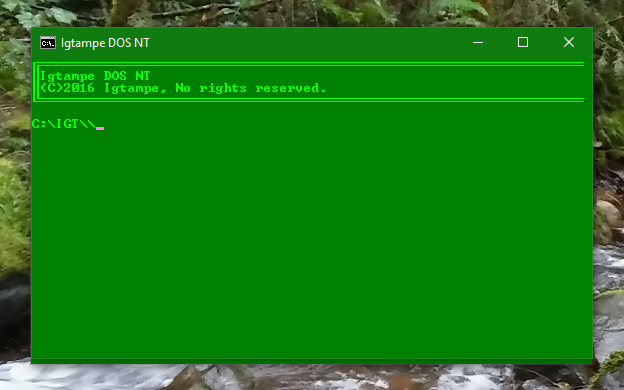
Igtampe DOS NT As demonstrated on Windows 10, with the Green theme.
Head on Over to the Igtampe DOS Blog on Blogger!
About
Igtampe DOS was a Small Project by Igtampe to Provide a Command
Prompt for those who don't have one. Certain Companies and Schools
Restrict access to the Command Prompt. Igtampe DOS solves that problem. By masking itself as a Program, It asks the user for input, and then executes it. It is, or at least was, A basic Command processor. Soon Igtampe DOS Grew to be an Expansive command processor, with more than half a million lines of code. A Feature list is denoted below.
NOTE: As of now, Igtampe DOS is no longer in Active development. To request bug fixes and/or patches, contact me at Igtampe @gmail.com. I'll be sure to push those out.
Features
-Basic Command Processing
-Full Compatibility with even Windows 2000.
-A Logging System
-A Theme System
-An App launching System
-Multiple Easter Eggs (Secrets)
-An Extensive amount of software. 27 Pieces of software Directly available!
-And some more things i Guess...
CHANGELOG AND UPDATES
Igtampe DOS NT (6010) Emergency Patch
- Removed IGTDOS.MARKER File lookup on startup. It was unnecessary, and new installs could NOT run or do updates with it
Igtampe DOS NT "New Technology after a HUGE 2 year development cycle!"
-
Added a Message Board System
-
Apps MSG and AddMSG have been added
-
Apps MSG and AddMSG have been added
-
MSG handles reading messages
-
AddMSG handles management of subscribed Message Boards.
-
Documentation on creating a Message Board will be delivered upon request.
-
Nabas checks for messages on bootup.
-
Added Verto Command Interpreter
-
Splits all arguments allowing commands like these to be possible:
-
"Say Hello this is Igtampe DOS"
-
"Calc 1+1"
-
"Shutdown DS"
-
Test using new app VertoTest
-
Added Safeguards for IGT Internal applications
-
Commands like NABAS, VERTO, or ACE will no longer crash the system.
-
Added Safeguards to prevent Igtampe DOS from starting outside of its home directory
-
Added RELOAD command
-
Used to reload Igtampe DOS more fully, including variable redefining and a NABAS restart.
-
Changed Sound Effects
-
All sounds, except Wake, Sleep, and Welcome, have been changed
-
Courtesy of:
-
DeviantArt User Sausen and his Longhorn Sound Scheme
-
Windows NT 5.0 Shutdown Sound
-
The Microsoft Sound by Brian Eno
-
Windows 200 Startup/Shutdown sounds
-
A Visual Overhaul
- Everything just looks better thanks to extended unicode characters.
-
Updated Infinity Text to 1.1
-
Removed hyphens for blank lines
-
Changed SPEAK command to SAY
-
Updated Copyright Dates
-
Made the Welcome screen stop its music when closed
-
Fixed bugs:
-
Shortcuts or secrets with spaces would not run (BETA ISSUE)
-
Restore would not work on install drives other than C:
-
N would not register as NO in custom theme maker
-
Removed "Launching NABAS IUC" notif on startup
IGTAMPE DOS TUCAN "No Not Toucan, Tucan!"
- Added All VBS APIs
- Sounds! Managed using SNDOPTIONS
- A Welcome screen
- 1 New Secret
- ACE (At command Executable)
- IUC Internet Update Checker added.
- NABAS Uses it at start up
- Can be relaunched using command IUC
- Added PARCO File explorer.
- NABAS looks nicer
- SOS Menu looks Nicer
- NOTIFCLS Command added to clear the NABAS Screen
- Speak Command added to use the Speak API
- Fixed Bugs
- PROGMAN would crash while uninstalling so fixed that.
IGTAMPE DOS LUNA SERVICE PACK 2 (7.2) ". . . - - - . . ."
- Added an Emergency Recovery System
- SOS Mode
- Uses a Backup or an Installation Drive for Recovery
- Launch using "IGT SOS"
- Failure to boot results in asking for SOS Mode.
- Added a Debug Window
- Launch using "IGT DEBUG"
- Launches Separate window that shows what Igtampe DOS is doing
- Can be used with apps! Just write the info to %DEBUGDIR%
- Added the Notification and Background Application System (NABAS)
- Notifications can be sent by writing to %NOTIFDIR%
- NABAS takes care of updating now.
- Every so often, NABAS will check all drives (Except C:) for an Igtampe DOS Installation Drive that has IGTAMPE DOS of a Higher Build. Once it determines such, it will copy the files to a temporary folder, and ask the user to shut down or Hibernate Igtampe DOS. Once this is done, It will update all files.
- Please Note: You must shutdown while IGTAMPE DOS is in it's MAIN DIRECTORY.
- Background Applications can be put into the NABAS Sub-directory of Apps.
- Backup has been ported to this system as a demonstration.
- Added 2 more secrets
- Igtampe DOS Is FINALLY FULLY Compatible with Windows XP and 2000! Thanks to a new WAIT API using VBS.
- You can now save a Memory Dump
- Backup writes ID, Version, And Build for Restore to read.
- Made Certain events Faster using the New WAIT API, such as the Boot and Shut Down animation Process.
- IGTINF now shows what version of Windows you're running instead of just 'Microsoft Windows" (Thanks WIN Variable)
- Updated Finder to 2.1
- Not as Specific Anymore
- Updated ALARMS to 3.2 (It Finally Works!)
- Switched to the new SoundPlay API which makes Sounds play in the Background
- Switched to the new MessageMaker API which makes messages look much nicer and be Universal.
- Switched to the NewTIme API originally implemented in the battery checker that makes the Time much Neater.
- Fixed Bugs:
- Fixed the One bug that made It not work, The Time to check for was not written properly, making it impossible to find.
- Fixed Bug that would make Alarm 7 not Function.
- Fixed Bugs:
- Fixed Bugs with Secrets to make them be able to be seen by XP and 2000 Users.
- Fixed Bug that would allow a Direct Boot happen when the Out of Box Experience (First Run Menu) has not been run.
IGTAMPE DOS LUNA (UPDATE 1) (7.1) "Finally, SHORTCUTS!"
- Added a Package System
- PKG Command
- Package Installer
- Example Package with the Plus! Pack for this update Included.
- PROGMAN Command
- Program Manager
- Uninstalls and Lists installed programs.
- Added Shortcut System
- Command String launched from Main Screen programmable using the Shortcut Manager, "SHRTCTMAN".
- Added two more Commands
- WWW
- Launches Igtampe DOS Website
- BLOG
- Launches Igtampe DOS Blog.
- Added 1 new Secret
- Added the Ability to make a Custom Theme.
- Added 1 new theme (Lava)
- Added a nice 12 second User Environment Loading Screen. (Does Run with Direct boot)
- Updated Time Utility
- No Longer shows Seconds and Miliseconds on Time
- No Longer shows Day on Date.
- No Longer 24-hour Format
- Updated Alarms to 3.1 (See Bottom of readme for Details)
- Made the Restore check ALL the drives to find backups.
- Touched up the First Run Procedure with a Better Looking Progress Bar
- Touched Up the Post-Crash procedure making it look nicer.
- Made a different Post-Crash procedure for BETA users.
- The Logging Procedure now logs on LOTS of Debug Info, Here is an Example:
[%Date%]: IGT.bat was started on %COMPUTERNAME%
Debug Info:
(%ID% %V% %BUILD%) ON %IGTDRIVE% %RAWFD%, XP=%XP%, Windows %WIN%
- Igtampe DOS now knows on which version of windows it's run (Variable %WIN%)
- 2000, XP, Vista, 7, 8, 8.1
- Could be used by programs or items on Igtampe DOS itself
- Sped up Post Hibernation Procedure.
- Changed the Name of the "Mid Blue" theme to "Ocean"
- Fixed Bugs:
- Fixed Bug that would make Some secrets not Log in the Logfile.
- Fixed Bug that would make holding Enter repeat the previous command.
- Fixed Uninstaller Permanently. Will delete any and all files in IGT.
- Fixed Bug that would make Midnight theme Not Work
- Fixed Alignment bug on one of the screens of regular booting (Not sure if this bug was made on Betas...)
LUNA ERROR
Fellow Users of IGTAMPE DOS, I Hereby apologize that during Luna's First phases of Launch, Most users received Build 5187, which is a BETA. All installation ISOs for LUNA now have Build 5188, the Full release of Luna. Sorry!
IGTAMPE DOS LUNA (7.0) "Up in the Sky!"
- This Version of IGTAMPE DOS is Fully Portable!
- For New apps, Find the "Designed for Portable IGT" label.
- DEVS! PAY ATTENTION. INSTEAD OF CD %FD% >> IGT, DO %IGTDRIVE% >> CD %FD% >> IGT.
- Added Hibernation Feature
- Saves Drive and Directory, and when starting, does Automatic Direct Boot.
- Added one new Secret.
- Added Two new Themes (Luna and Gray)
- Made BETA Versions display More Technical Info in the Main Screen.
- Made Exit do a Hibernation instead of a Direct Shutdown.
- Updated Shutdown to 2.0
- Added Hibernation
- Reorganized to look easier to read.
- Updated IGTAMPE INSTALLER to 5.0
- See IGTAMPE INSTALLER section At bottom of Readme.
- Updated IGTBIOS to 2.4.2
- Decided to Remove Boot Options
- Boot Options do NOT work no matter what is modified and it has been decided to remove them.
- Removed Texteria
- If you had a Previous Copy of IGTDOS, it will not be deleted.
- Removed Sounds for Alarms
- Alarms Settings Application makes it easier to set a sound instead of coosing from a limitted Library, removing the need for a sound library in te First Place
- Fixed Bugs:
- Fixed Bugs that would make Most Built in Apps and Some Internal commands notFunction properly if they were not executed on the installation Drive or if the installation Drive was not C:.
- Fixed Bug that might make the First Run not Propperly create Folders in the Installation Directory
- Fixed Bug that would make Defboot make the user return to their DLLFILES directory.
- Fixed Bug that would make the Install Directory Hidden
- Fixed Bug that would make the Install Directory Hidden again after updating.
- Fixed Bug that would make the First Boot Agent Run again if the System was not restarted on the installation Drive.
- Fixed bug that would make Igtampe DOS think "*" was an App.
- Fixed Bug that would make the User return to their DLLFILES directory if there was an Error Updating
- Fixed bug that would make Igtampe DOS not use the Crash Resistancy if there was an
- error launching an app.
- -Fixed bug that would make the user return to their APPS directory if an App failed to Launch
The Rest of the Versions were made BEFORE the making of this site. For them, See the Readme file when you install IGT.
Igtampe DOS is (C)2016 Igtampe No Rights Reserved.
All parts of this program or any of its contents may be reproduced, copied, modified, or adapted, even without the prior written consent of the author, unless otherwise indicated (Which will never happen) for stand-alone materials (Bundled Programs)Are you really reading this? Oh my god you are! Seriously though this is just a notice saying that, no, I don't hold rights to refrain you from copying these programs and yes, you can copy/pirate them, but really, for what? These programs are already free, and they are just strings of commands! Someone already probably programed these before me but didn't publish them! And if you want to get the Actual command executing programs behind all this you're going to have to deal with MICROSOFT! I don't think you want to do that. All in all, if you want to copy these, Fine. Just please put it somewhere that I was the creator or something!